Methods
Overview
This page explains the kinds of data and analyses used to create the xQTL Atlas, from preprocessing raw data to packaging portal-ready files. For users who want implementation-level detail, please see the medRxiv manuscript and the pipeline Github.io pages.
Analysis pipeline
The ADSP FunGen xQTL Atlas takes genetic and molecular phenotype data from various cohorts and brain contexts (tissues and cell types) and makes the significant results openly available. To carry this out, five major steps turn phenotypes, genotypes, and sample covariates into significant associations:
- 1 Preprocessing Prepare genotype, phenotype, and covariate data for analysis.
- 2 Association testing Obtain xQTL and fine-mapping results.
- 3 Annotation Label variants and molecular targets with relevant genes.
- 4 Harmonization Standardize formats, alleles, and molecular targets.
- 5 Integration Collect significant results for portal search.
These steps are explored in more detail toward the bottom of this page. Click on the pipeline step names to navigate.
FunGen-AD xQTL data flow
This flow chart shows at a high level the steps that take place from input to standardized output.
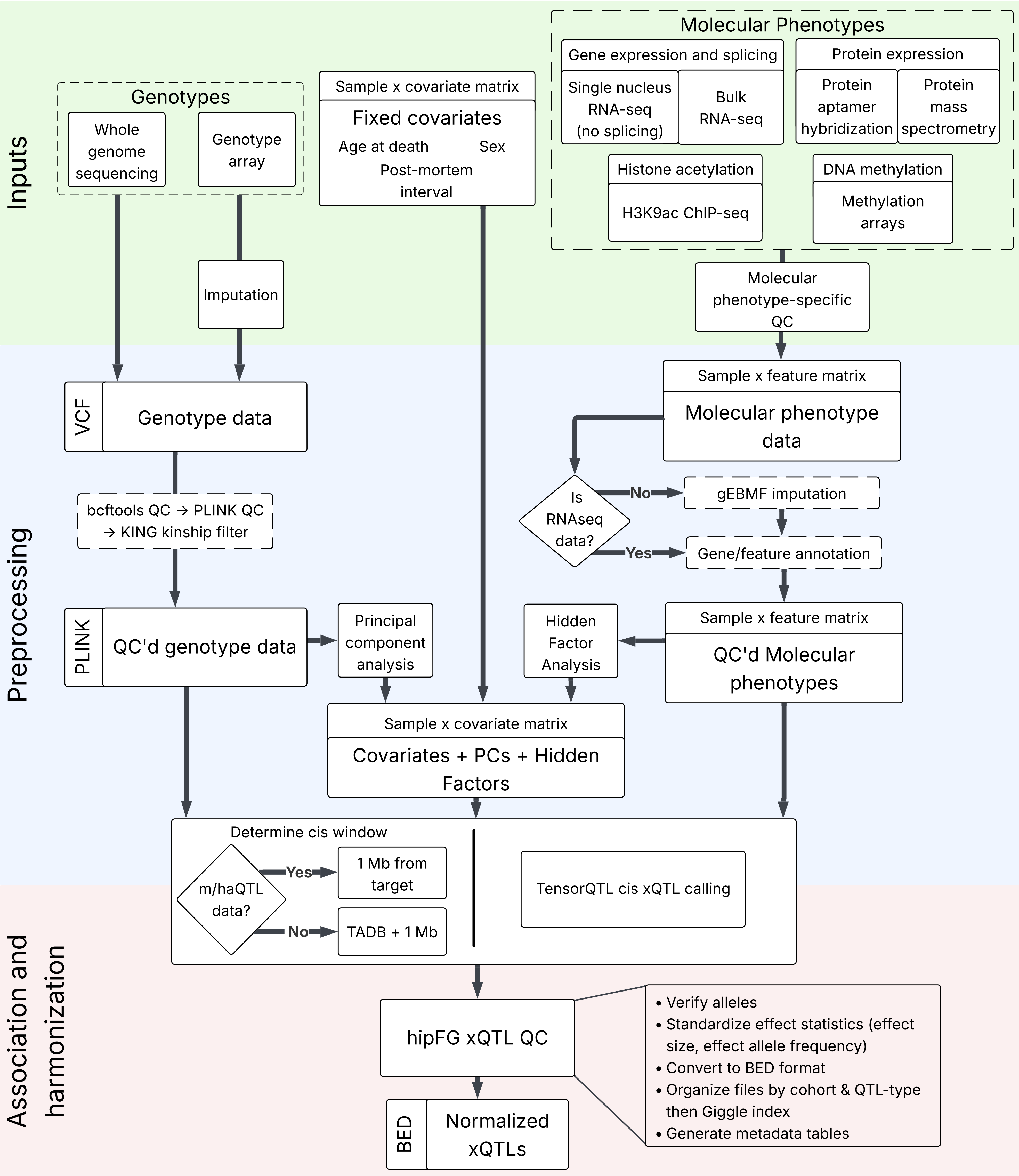
Preprocessing
TADB-enhanced cis windows
A reference set of gene testing windows was created to increase the number of testable QTLs in a biologically justified manner. Topologically associated domains (TADs), which are genomic regions with enriched local chromatin contacts, were combined with gene spans according to GENCODE v37 (Ensembl 103) to generate these windows. The complete procedure is described in the manuscript. Briefly, TADs obtained from hippocampus and cortex data from the 3D Genome dataset were combined with a recursive overlap and extension function to create a set of non-overlapping TADs and boundary regions (TADBs). To create TADB-enhanced cis windows for each gene, each gene was extended by 1Mb in each direction of its TSS/TES and overlapped with the TADB set. The outermost boundary detected for each gene was saved as the boundary for its TADB-enhanced cis window.
Genotype data
Genotype data was obtained from both genotyping arrays and whole genome sequencing (WGS). Array data underwent imputation with either the 1000 Genomes or TOPMed reference panels. Unrelated individuals in the data were identified, and principal component analysis (PCA) was carried out. All individuals were projected onto this PC space for later steps.
Molecular phenotype data
Various tools were used to prepare molecular phenotype data spanning gene expression, protein abundance, splicing isoforms, DNA methylation, and H3K9 acetylation (histone acetylation). While these phenotype-specific preprocessing steps are described in depth in the manuscript, there are shared downstream steps.
All molecular phenotypes except for single-nucleus and bulk gene expression underwent missing data imputation with grouped Empirical Bayes Matrix Factorization (gEBMF). Different phenotypes were filtered at the target and sample level for phenotype-specific missingness standards. Splicing and both bulk and single-nucleus expression data were annotated with TADB-enhanced cis windows. Molecular phenotypes were residualized on the genetic principal components and sample phenotypes (i.e. covariates), estimating hidden factors via PCA. Principal components above the Marchenko-Pastur threshold were preserved.
Covariate preprocessing
Covariates were collected at the sample-level including RNA integrity number (RIN), post-mortem interval (PMI), and study of origin. Not all of these covariates were available for all cohorts. Molecular phenotype and genotype PCs were combined to the covariate matrix for each sample.
Association testing
xQTL calling
xQTLs were called using TensorQTL 1.0.10 for each cohort, context (cell type or tissue), molecular phenotype, and chromosome combination separately. Inputs included the preprocessed genotype, phenotype, and covariate data for all samples in this dataset for which data was available. TADB-enhanced cis windows were included as an input for all QTL-types except for DNA methylation and histone acetylation (m/haQTLs), for which standard 1Mb windows were used. xQTLs were called for variants minor allele counts of 5 or greater.
Fine-mapping
The sum of single effects model (SuSiE) tool was used for single context fine-mapping of gene expression, splicing, and protein abundance data. The sum of single functions (fSuSiE) tool was used for histone acetylation and DNA methylation data. These were carried out on the individual genotype and phenotype (non-summary statistics) data, and decompose genetic effects into a sum of single-effect components returning a posterior inclusion probability (PIP). Unlike xQTL calling, fine-mapping was only carried out for protein-coding genes.
Annotation
A gene "partition" was created from GENCODE v37 (Ensembl 103), identifying the overlapping or nearest genes at each strand-specific locus of the genome. Upstream of each gene TSS, 10-kb promoter regions were added. Introns were inserted between fragments of the same transcript ID to ensure contiguous gene bodies.
This partition was used to annotate all variants in output xQTL and fine-mapping results with overlapping genes, prioritizing, in descending order: coding segment (CDS) exons, 5'UTR exons, 5'UTR introns, 3'UTR exons, 3'UTR introns, coding segment introns, exons for non-coding genes, introns for non-coding genes, promoters, and intergenic regions. Variants overlapping features on both strands were resolved using this prioritization scheme.
Histone acetylation and methylation targets were overlapped with this partition to link them to the most relevant target genes. Acetylation peaks were annotated and their midpoints and methylation sites were annotated at the site of the C in the CpG island.
Lastly, each splicing target was annotated for a relevant target gene. Splicing-site queries of the partition prioritized fragments exactly matching feature (e.g., exon, UTR'5 exon) boundaries and allowed for multiple gene assignments if features were overlapped for two genes and at least one end exactly matched a fragment boundary. Splicing targets marked with a "?" strand used the gene annotation provided by the LeafCutter2 expanded cluster annotation.
Harmonization
hipFG was used to normalize output formats for BED-compatibility as well as perform a number of data quality adjustments. Associations with * provided as the target allele were removed, and Benjamini-Hochberg FDR was calculated (using the nominal p-value) while stratifying for target on the remaining records. Alleles were left-aligned and normalized against dbSNP build156 and a reference genome (hg38) to ensure test/effect statistics always correspond to the non-reference allele. All datasets were split into SNP-only and INDEL-only.
Integration
Significance-based filtering
BH-significant data
Significant records were identified using Benjamini-Hochberg FDRs by filtering for p-value < 0.01 & FDR < 0.05 & ma_samples > 1. Not all BH-significant records are available through this portal.
Hierarchical multiple testing
A Bonferroni-adjusted target p-value was determined for each target (within each dataset) by multiplying its lowest nominal p-value by the number of variants tested against it. These target-based adjusted p-values were then BH corrected and those targets with BH FDR < 0.05 were preserved. Records for the remaining targets were removed if their nominal p-value x number of target tested variants was greater than the greatest remaining Bonferroni-adjusted target p-value.
95% credible set associations
SuSiE and fSuSiE results identified variants belonging to 95% credible sets (CS95), indicating the set of variants with prioritized associations to the molecular phenotype levels according to the fitted fine-mapping model. After removing records with * alleles, CS95 sets were removed if remaining variants did not have PIPs summing to 0.95. Additionally, all fine-mapping records were annotated with corresponding xQTL records (with the same molecular phenotype target and input alleles) and records lacking a corresponding HMT-significant record were removed.
Indexing for search
On the back-end of this Atlas, xQTL and fine-mapping results are separated into directories based on cohort, xQTL type (a fine-mapping set for gene expression data is considered to have eQTL as its xQTL type), and association significance. All files are saved alongside Tabix *.tbi files and these directories are indexed with Giggle for rapid position-based search. Searches are powered by the full metadata indicating each file's path, source dataset, context, and more.